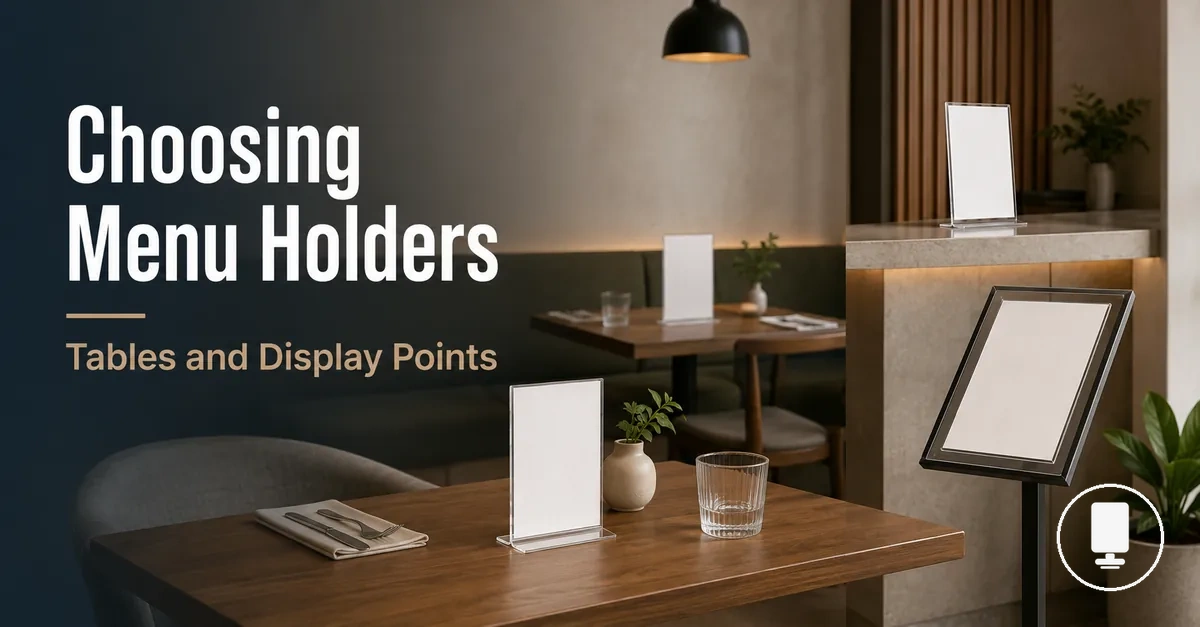
Bulk Menu Holders for Multi-Table Display Planning
Bulk menu holders are a planning context for choosing menu holders across more than one table, counter, or shared display point. The goal is to keep menus visible, fitted to the right insert size, and practical for daily handling while leaving room for spare units where the service layout may need them. Quantity planning should connect each menu holder set to multiple tables and display points, not to a fixed count.
Tables, counters, and shared displays can create different needs because each point may change the viewing angle, handling frequency, footprint, and visibility requirement. A table menu holder pack may work for repeated table settings, while counter menu holders or menu display holders may need a different format or material fit. For broader category context, use the menu holders guide before treating bulk planning as a product catalog. There is no one-size-fits-all count because layout, service model, and menu update frequency can change the decision.
The selection frame should start with service area, holder format, insert size, orientation, visibility, material fit, spare units, and pack value. Product examples belong later, after the criteria show whether a coordinated set can support the venue without weak-fit holders, avoidable overbuying, or reduced decision confidence.
When Menu Holders Need to Be Planned as a Set
Set planning becomes relevant when the same menu display must work across repeated customer touchpoints. Menu holders are planned as a set when one display requirement extends across more than a single location within the service layout. The focus shifts from choosing one holder to maintaining a coordinated display approach. Detailed placement logic matters only where it affects multi-point planning.
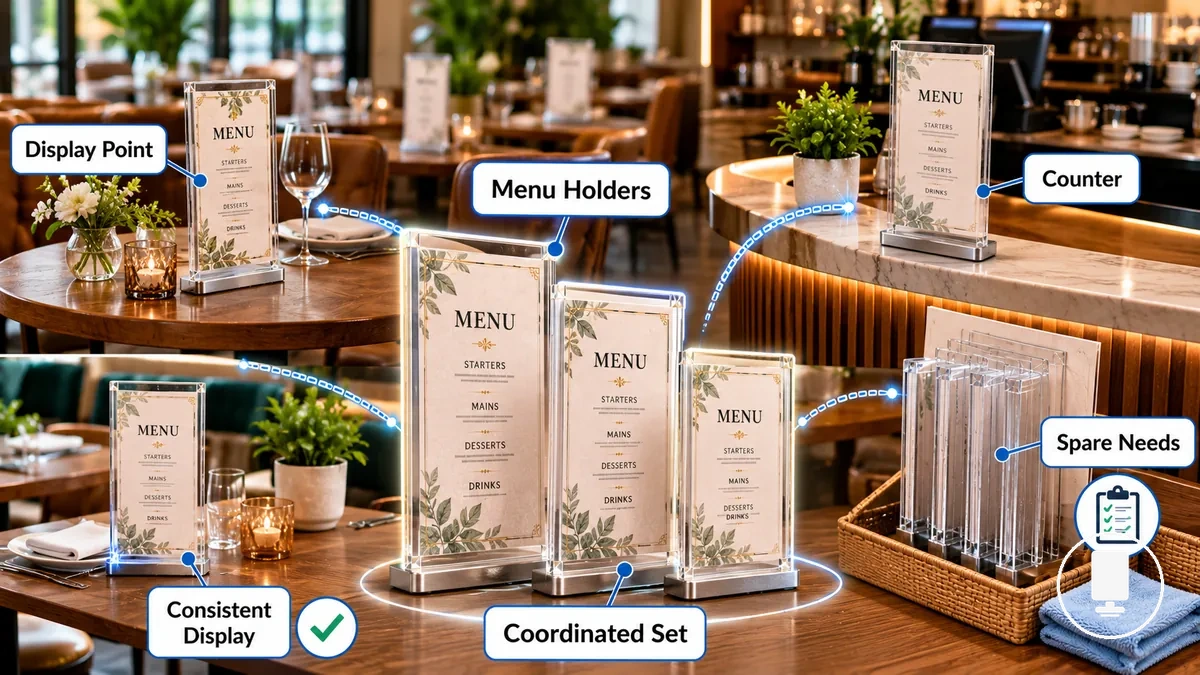
Tables, a counter, and each display point are common triggers for set planning. For example, the same menu may appear at dining tables and a service counter within one venue. When repeated customer touchpoints share the same information, a coordinated set can support more consistent menu presentation through aligned insert size, orientation, and display format. The trigger is the need for consistency across connected viewing locations rather than any fixed quantity.
A coordinated set is a menu holder set selected to work together across multiple tables or service areas, while a single-holder choice serves only one location. This distinction helps separate individual selection from set planning without creating an exact venue formula. Spare needs may also influence planning because replacement requirements can vary with venue conditions and handling frequency.
Menu Holders, Covers, Stands, and Table Tents in Bulk Planning
Display format choice affects visibility, handling, and replacement behavior across many placements. Menu holders in bulk planning should be evaluated by how each format works across repeated display points rather than by appearance alone. The main formats include menu holders, menu covers, stands, table tents, and insert-based formats.
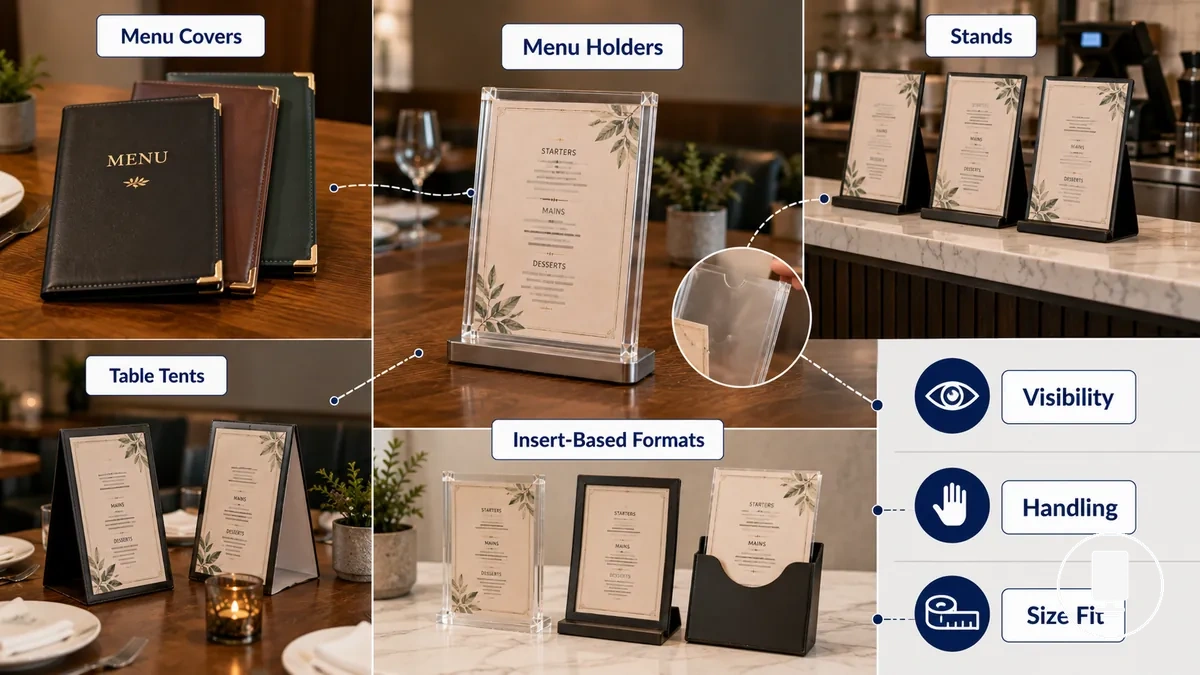
Display format differences become more noticeable when the same information appears across tables, counters, and temporary display points. Menu covers may change handling and replacement behavior because updates can depend on how content is inserted or exchanged. Stands often prioritize line-of-sight visibility at counters, while table tents can support short-term messages viewed from more than one side. Insert-based formats place greater emphasis on insert changes and size fit, which is why a criteria-led comparison helps separate similar-looking options.
| Display Format | Key Attribute | Venue Condition | Selection Effect |
|---|---|---|---|
| Menu Holders | Visibility and presentation | Repeated display locations | Can support consistent menu display across placements |
| Menu Covers | Handling and content updates | Menus that may change over time | Replacement behavior can depend on update frequency |
| Stands | Line of sight | Counter or reception viewing | May improve menu visibility from standing positions |
| Table Tents | Shared viewing | Temporary messages or promotions | Can support visibility from multiple directions |
| Insert-Based Formats | Insert changes and size fit | Frequent content replacement | Selection depends on insert compatibility and update needs |
Table, Counter, and Display Point Coverage
Placement location determines the compatibility requirements for menu holders because coverage depends on where the holder is viewed or handled. Visibility distance, contact frequency, footprint, and stability can vary by service condition, so the same holder may not suit every placement location in the same way. Table coverage, counter coverage, and display point coverage should be evaluated through the relationship between location and holder attribute.
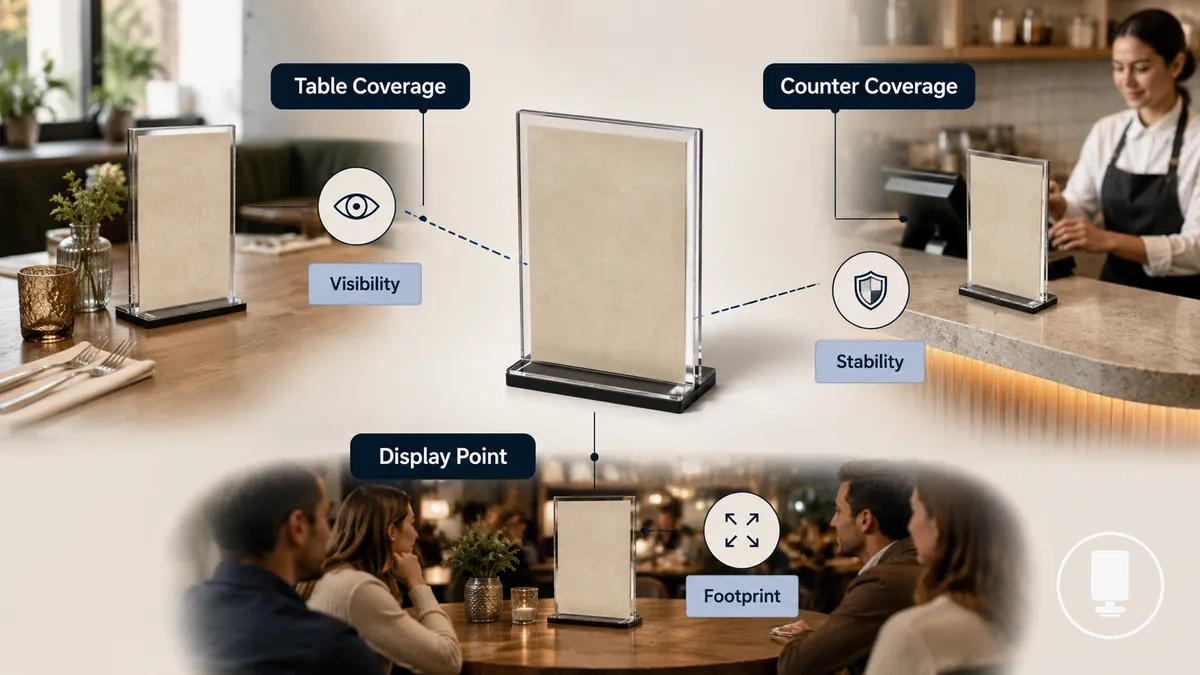
Table coverage often places more emphasis on guest access and visibility distance, while counter coverage may place greater importance on line of sight and handling frequency. A shared display or other display point can make footprint a more significant factor when visibility must be maintained within limited space. Different service conditions can also change how important stability becomes, which is why the table below connects each placement location to its primary compatibility requirement.
| Placement Location | Primary Attribute | Compatibility Requirement |
|---|---|---|
| Table Coverage | Visibility Distance | Depends on guest access and viewing position |
| Counter Coverage | Contact Frequency | May require attention to handling and line of sight |
| Display Point Coverage | Footprint | Often balances shared viewing with available space |
| Busy Service Point | Stability | Can become more important when handling frequency increases |
For deeper location-specific context, see menu holder placement.
Dining Table Coverage
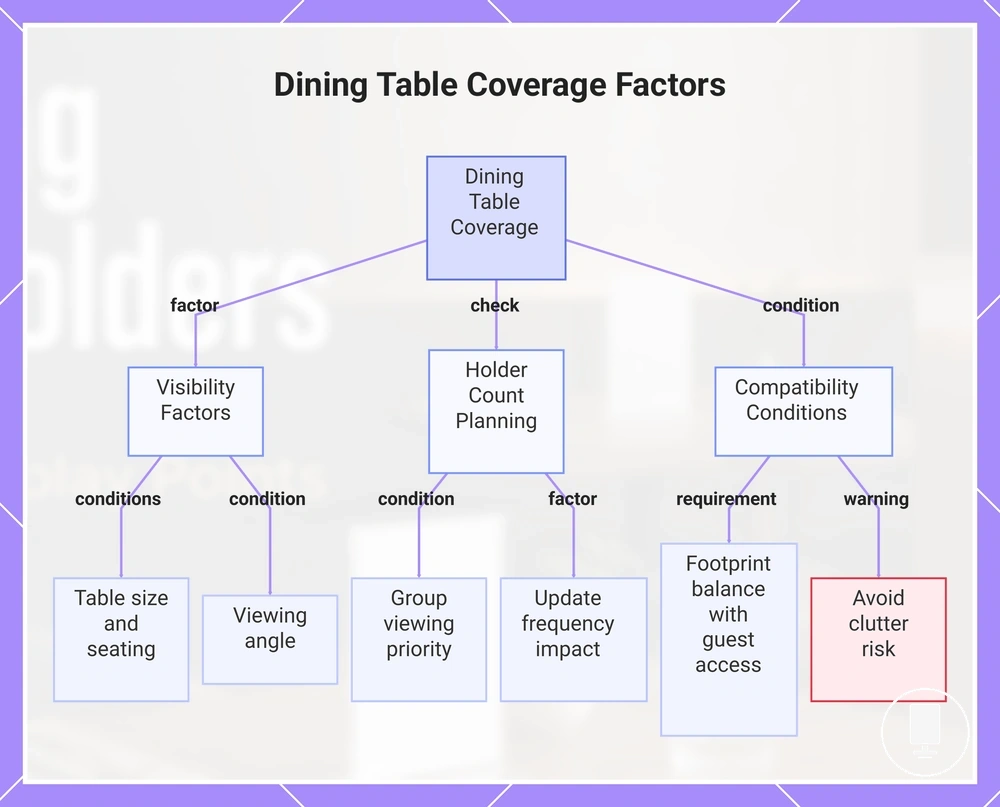
Dining table coverage depends on table size, seating position, and viewing angle because these conditions influence how easily menu holders can be seen and accessed. Larger table displays or wider seating arrangements may require different visibility considerations than smaller tables, while holder footprint should remain balanced against guest access and clutter risk. Holder count planning should remain qualified because shared viewing needs can vary by table configuration.
When a table is used by a group, shared viewing can become more important than on a smaller table with fewer seating positions. Menu update frequency may also affect table coverage when insert changes are expected, as replacement ease can become part of selecting a table menu holder. Compatibility depends on maintaining visibility and guest access without allowing holder footprint to occupy more table space than the setting requires.
This chart shows the main factors that influence dining table coverage for menu holders, including visibility conditions, holder count planning, and compatibility requirements.
Counter and Service Point Coverage
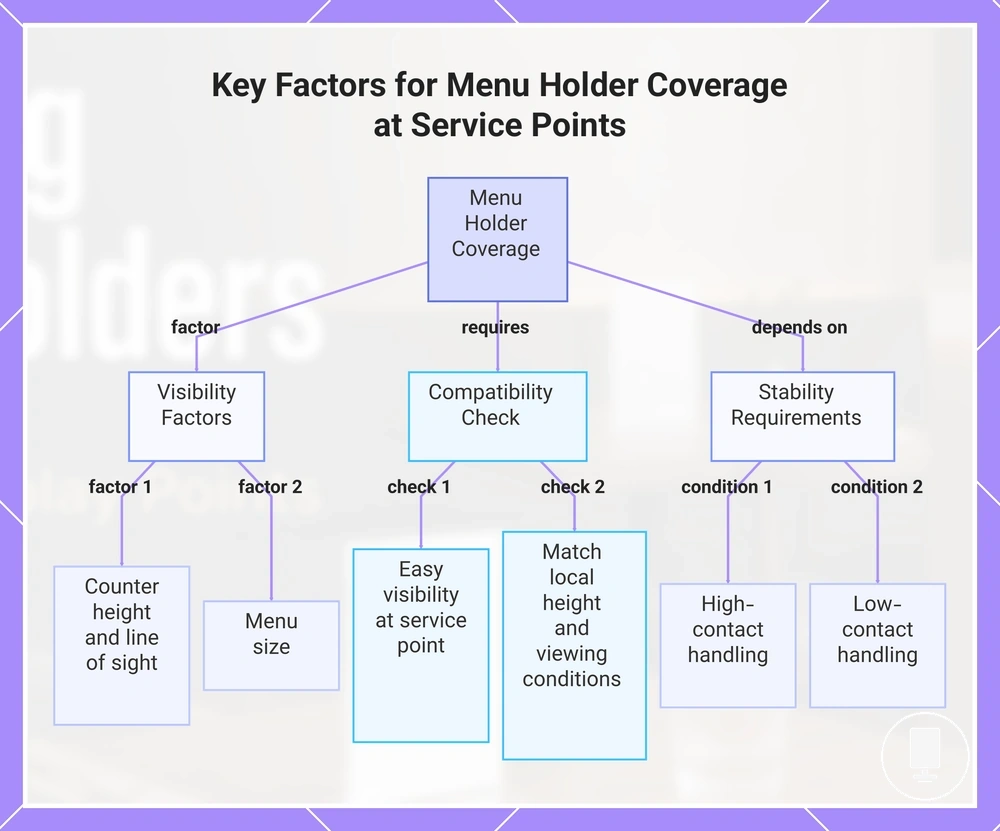
Counter coverage depends on how menu holders are viewed from a fixed position because counter height, line of sight, and menu size directly influence visibility. When customers view a countertop display from a queue or ordering point, the holder angle may need to align with the expected customer view rather than a shared viewing arrangement. The main compatibility check is whether the menu remains easy to see at the service point while matching local height and viewing conditions.
At a high-contact service point, handling frequency can place greater emphasis on stability than at locations where the display is rarely touched. Menu size may also affect compatibility because larger displays can change how a holder fits within available counter space. When staff handle the display regularly, stability requirements may differ from a service counter that is viewed mainly from a customer’s fixed position.
This chart shows the main factors that determine counter display coverage, including visibility influences, compatibility checks, and stability conditions based on handling frequency.
Shared Display and Promotional Point Coverage
Shared display coverage refers to menu holders used at non-table locations where menu-adjacent information must remain visible to multiple viewers. A shared display or promotional point can support temporary inserts, daily specials, or seasonal menu updates when the content remains connected to menu display needs. Promotional use remains relevant only when the holder supports menu or menu-adjacent information rather than broader promotional activity.
Shared display and promotional point coverage depends on visibility, message rotation, and physical placement. When daily specials or seasonal inserts move between service areas, shared viewing conditions and viewing direction may influence whether double-sided visibility is useful and how often temporary inserts need to be updated.
- Insert purpose should remain focused on menu-related or menu-adjacent information.
- Viewing direction may affect the value of shared viewing and double-sided visibility.
- Stability can become more important when menu holders are placed in active service areas.
- Update frequency may influence how often temporary inserts are rotated or replaced.
- Movement between service areas can increase the need to consider handling and placement conditions.
How Many Menu Holders Are Needed Per Area
How many menu holders are needed per area depends on the layout, viewing distance, and spare needs because no fixed count works for every venue. The holder count should be based on the number of display locations that require menu visibility rather than a universal quantity rule. Quantity planning should evaluate each area through its display coverage requirements and adjustment needs.
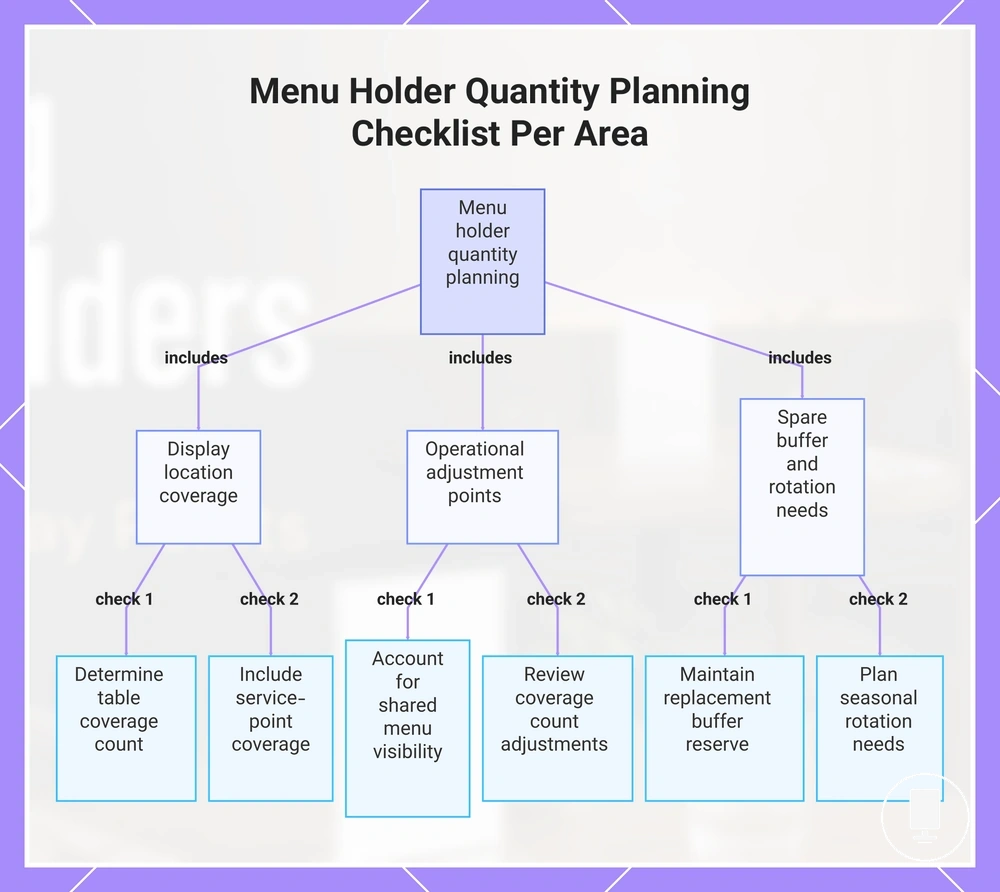
The main quantity-planning challenge is translating table count, counter points, and shared displays into a practical coverage count. Each service area acts as a quantity driver because customer access, viewing distance, and display purpose can change how many menu holders may be needed. Counter points and shared displays should be included alongside table locations so all menu-viewing positions are represented in the plan. A replacement buffer serves as a reserve for damaged or unavailable units, while spare needs can support continuity when holders are moved, cleaned, or temporarily removed.
For a small layout, quantity planning may remain close to the number of active display locations. A medium layout may require additional consideration for shared displays and movement between service areas, while a busy layout can place greater emphasis on rotation needs and reserve availability. The checklist below organizes area, count driver, and spare buffer so the planned holder count increases or decreases only when display conditions justify it.
- Tables → quantity driver: table count → condition: customer access and viewing distance → planning outcome: determine table coverage count.
- Counters → quantity driver: counter points → condition: fixed viewing locations → planning outcome: include service-point coverage.
- Shared displays → quantity driver: shared displays → condition: multiple viewers or rotating content → planning outcome: account for shared menu visibility.
- High-traffic points → quantity driver: handling frequency → condition: movement or repositioning → planning outcome: review coverage count adjustments.
- Replacement buffer and seasonal rotation → quantity driver: spare needs and rotation needs → condition: temporary replacement or content changes → planning outcome: maintain reserve units when appropriate.
This checklist shows the main quantity drivers and planning outcomes for determining how many menu holders are needed per area based on display location, operational needs, and spare buffer requirements.
One Holder Per Table Versus Multiple Holders Per Table
One holder per table or multiple holders per table depends on table size, seating count, and viewing access. The choice can change when table shape affects viewing angle or when service style changes how guests interact with the menu. Viewing angle, menu type, service style, and clutter risk are the main comparison factors.
| One Holder Works Better When | Multiple Holders Work Better When |
|---|---|
| Seating count is lower and a shared holder can be viewed comfortably from all seats. | Seating count is higher and viewing angle may limit access to a single holder. |
| Table shape supports shared viewing with lower clutter risk. | Table shape creates separate viewing positions that may benefit from an extra holder. |
| Menu type is compact and easy to share across the table. | Menu type may require broader access or more frequent reference during service. |
| Service style supports menu access from a central position. | Service style may benefit from distributing menu visibility across the table. |
Extra Units for Rotation, Damage, and Replacement
Extra units protect continuity when menu holders are rotated, damaged, or temporarily removed. Spare menu holders can help maintain visual consistency across multiple display points during daily use, while replacement timing may vary by handling conditions and wear. Spare planning should remain flexible because rotation, damage, and service demands can differ between locations.
Damage, cleaning downtime, and seasonal insert changes can create temporary gaps when the same display standard must be maintained across multiple locations. A replacement buffer or backup holders can support service continuity during temporary removal, menu updates, or replacement delays. For deeper decisions about holder replacement, see replacement planning.
- Cleaning downtime: keep spare units available when active holders are being cleaned.
- Damaged holders: use spare menu holders to support visual consistency during replacement.
- Insert rotation: plan extra units when menu updates move between display points.
- Seasonal updates: keep spare units available for seasonal insert changes and menu revisions.
- Emergency spare needs: maintain backup holders where uninterrupted display coverage is important.
Format Consistency Across Multiple Locations
Matching sets are most useful when multiple locations share the same viewing and handling needs. Format consistency across multiple locations can simplify replacement, cleaning routines, and operational simplicity because the same display approach is maintained throughout the venue. Controlled variation becomes more appropriate when visibility condition or usage requirements differ between tables, counters, and displays.
Format, finish, insert size, orientation, material, and cleaning burden are the main criteria that influence set consistency. Matching sets can support easier maintenance when the same visibility condition applies across multiple locations, while controlled variation may be justified when display conditions differ. Insert size and orientation affect presentation consistency, while material and cleaning burden can influence daily handling requirements. The table below organizes when matching or variation may be the safer decision.
Mixed formats can be appropriate when counters, tables, and shared displays serve different visibility conditions. In these situations, controlled variation should respond to a specific venue condition rather than create unnecessary differences between display points. The decision depends on whether the benefit of variation outweighs the value of operational simplicity and coordinated holders.
| Consistency Factor | Match Across Locations When | Allow Variation When | Decision Risk |
|---|---|---|---|
| Format | Locations share similar display and handling needs. | Venue conditions require different display approaches. | Unnecessary variation may reduce operational simplicity. |
| Insert Size | The same content format is used across multiple locations. | Display areas require different content dimensions. | Mixed sizes may complicate replacement and updates. |
| Orientation | Viewing conditions remain similar throughout the venue. | Visibility condition changes between locations. | Different orientations may reduce set consistency. |
| Material | Daily handling and maintenance needs are similar. | Specific locations have different usage conditions. | Variation may increase maintenance complexity. |
| Cleaning Burden | The same cleaning process applies across locations. | Some display points require different maintenance routines. | Different cleaning requirements may reduce process consistency. |
Double-Sided Visibility and Page Capacity
Double-sided visibility helps when menus are viewed from more than one direction because viewing direction directly affects readability across multiple tables and service points. A single-sided display may suit one primary viewing position, while a double-sided display can support readability when guests approach from different sides. Page capacity remains a local attribute that influences how much content can be displayed within the same menu holder setup.
Page capacity relates to page count, insert changes, and viewing direction rather than acting as a separate format decision. When insert changes occur frequently, insert capacity may affect update convenience, while table traffic can influence whether a two-sided display supports easier viewing across repeated locations.
- Viewing direction: double-sided visibility can improve readability when menus are approached from more than one side.
- Page count: page capacity should align with the amount of content that needs to remain accessible.
- Insert changes: frequent updates may increase the importance of insert capacity and replacement ease.
- Table traffic: traffic patterns can influence whether single-sided or double-sided viewing is more practical.
Size, Orientation, and Insert Fit
Insert fit depends on the printed menu, holder opening, and viewing position because these elements determine whether the menu remains usable across repeated locations. Size, orientation, and insert fit should align so the printed menu matches the holder opening and supports readability at the intended visibility distance. The table below organizes how printed menu conditions affect holder usability and repeatable fit.
| Entity/Part | Attribute/Criterion | Value/Condition | Effect/Decision |
|---|---|---|---|
| Printed Menu | Print Format | A-size or local print format chosen for the venue | Insert fit depends on matching the menu insert to the holder opening. |
| Holder Opening | Page Fit | Opening accommodates the printed menu dimensions | Supports repeatable placement across multiple locations. |
| Orientation | Portrait or Landscape | Selected according to viewing position | May improve readability when aligned with display conditions. |
| Insert Thickness | Replacement Ease | Thickness varies by menu design and material | Can influence how easily inserts are changed. |
| Viewing Distance | Visibility Distance | Distance varies by table, counter, or display location | Readability may depend on print format and placement conditions. |
Material Fit for Daily Handling and Visibility
Material fit depends on daily handling, cleaning, visibility, and stability because repeated use can influence how menu holders perform across multiple locations. Acrylic, wood, metal, and clear display surfaces each present different handling conditions, visibility characteristics, and damage risk considerations. Material choice should be matched to the expected display environment and handling frequency.
High-touch locations may place greater emphasis on cleaning and stability, while low-touch locations may place more emphasis on visibility and appearance consistency. Material behavior can vary with handling conditions and maintenance practices, so suitability depends on the specific use case rather than a universal ranking.
- Cleaning: Acrylic and other clear display surfaces may be considered when wipe-clean maintenance and visibility are important.
- Clarity: Clear holders can support menu readability when visibility is a primary display requirement.
- Stability: Metal may be suitable when display stability is a higher priority under repeated handling conditions.
- Finish Wear: Wood finishes may show different wear patterns depending on handling frequency and care practices.
- Handling Frequency: Material fit should account for daily handling because damage risk can vary with usage intensity.
Bulk Menu Holder Checklist Before Choosing a Pack
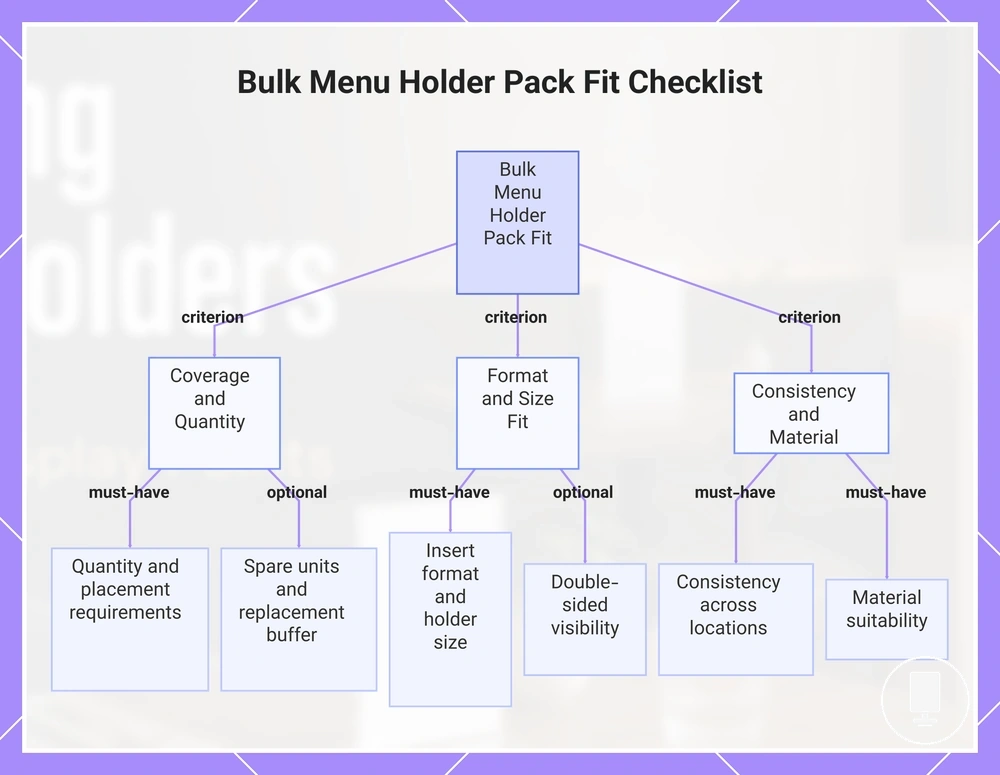
A bulk menu holder checklist should verify fit before choosing a pack because quantity, placement, and display requirements need to work together across multiple locations. The checklist confirms whether the planned holder count matches actual usage conditions. It also sets the verification scope for placement, format, sizing, materials, and spare needs.
Quantity, placement, format, size, material, and spares are the primary criteria that influence pack fit. Table count, counter points, and shared displays should be reviewed together so all display locations are represented. Insert format, double-sided visibility, and material suitability should be checked against the intended viewing and handling conditions. For broader decision criteria, use the menu holder selection checklist.
The bulk menu holder checklist below verifies quantity, placement, format, size, material, and consistency requirements before choosing a pack. Each item contributes a separate validation step rather than repeating earlier selection details.
- Must-have: Confirm table count, counter points, and shared displays so quantity requirements reflect actual coverage needs.
- Must-have: Verify insert format and holder size compatibility because insert fit depends on the printed menu and holder opening.
- Must-have: Check consistency requirements across locations when matching formats, orientations, or display styles are important.
- Must-have: Review material suitability according to handling frequency, cleaning needs, visibility, and stability conditions.
- Optional refinement: Consider double-sided visibility when menus may be viewed from more than one direction.
- Optional refinement: Evaluate spare units and replacement buffer needs when rotation, damage, or seasonal updates are expected.
Decision signals are straightforward: must-have checks verify whether the planned pack can support coverage, fit, and consistency requirements, while optional refinements depend on local display conditions. Pack fit may change when viewing direction, handling frequency, or spare-unit planning becomes more important for a specific location.
The products below are useful examples for comparing available options. Before buying, check that the compatibility criteria, key features, and product details match your needs.


This chart shows the must-have and optional checks to verify pack fit before choosing a bulk menu holder pack.
Pack Value Without Overbuying Weak-Fit Holders
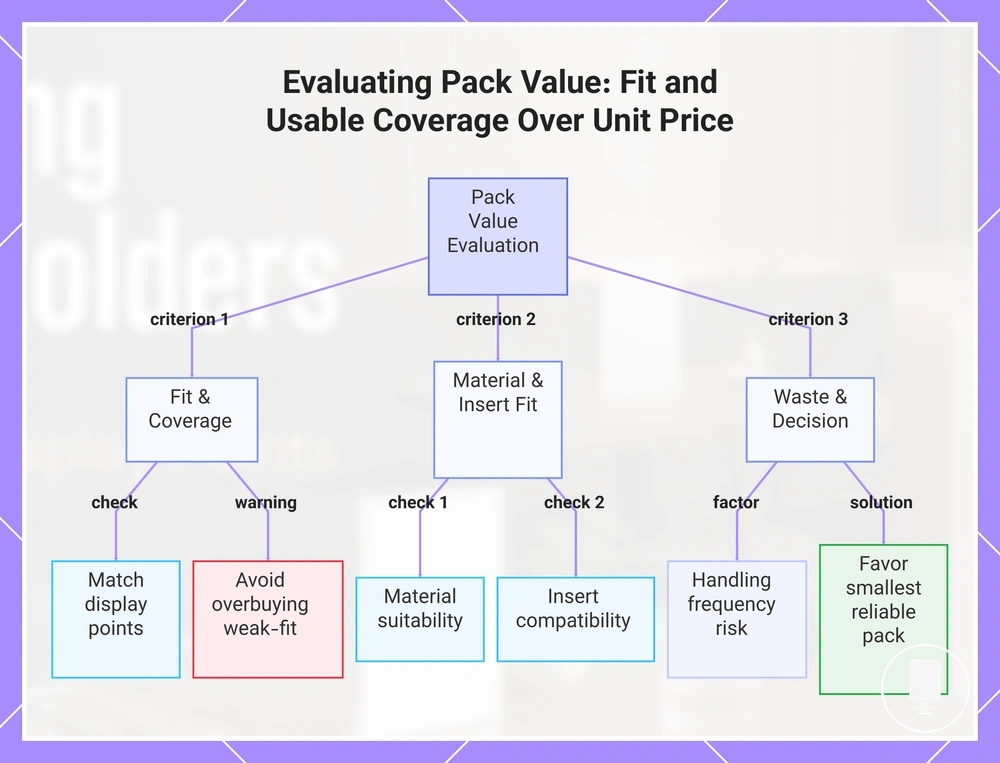
Pack value depends on fit and usable coverage, not only unit price. A bulk pack provides better value when the holders match the venue conditions and remain useful across the required display points. This cost-value view balances quantity, fit, consistency, and replacement needs rather than focusing on unit price alone.
Pack size, spare quantity, material suitability, insert compatibility, and handling frequency are the primary criteria that influence pack value. A larger bulk pack may reduce unit price, but overbuying weak-fit holders can reduce usable coverage when the holders do not match placement or display requirements. Material suitability and insert compatibility should support the intended usage conditions, while handling frequency can affect replacement risk over time. Value improves when quantity planning reduces avoided waste rather than simply increasing holder count.
Pack value should be evaluated alongside broader price and value factors because unit price is only one part of the decision. Weak-fit holders can reduce value when replacement needs increase or when the holders cannot support the intended display conditions. A comparison based on fit and usable coverage is usually more reliable than a comparison based only on pack quantity.
The value checklist below helps verify whether a bulk pack supports venue requirements before quantity becomes the deciding factor. Each check should be reviewed against actual display conditions rather than assumed savings.
- Check whether pack size matches required display points and usable coverage needs.
- Review spare quantity against realistic replacement risk and handling frequency.
- Confirm material suitability for the expected cleaning, visibility, and stability conditions.
- Verify insert compatibility so holders can support the intended menu format.
- Consider whether the planned quantity reduces avoided waste or increases overbuying risk.
The final decision cue is to favor the smallest reliable pack that covers required points and realistic spares. This approach can reduce overbuying risk while maintaining usable coverage, consistency requirements, and replacement flexibility when conditions change.
The products below are useful examples for comparing available options. Before buying, check that the compatibility criteria, key features, and product details match your needs.
This chart shows the key criteria to evaluate holder pack value, focusing on fit, coverage, and avoiding overbuying weak-fit holders.