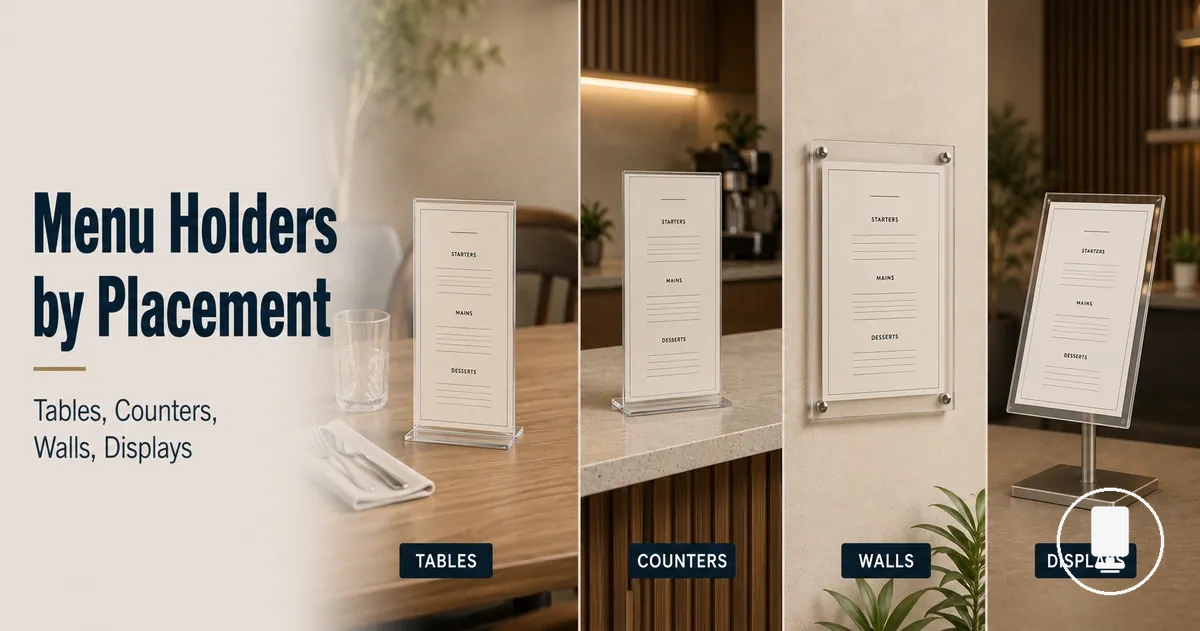
Menu holder placement compatibility for tables, counters, walls, and displays
Menu holder placement compatibility depends on whether the holder format matches the surface type, visibility need, access path, stability condition, and update needs of the placement context. A menu holder that fits a table may not work the same way on counters, walls, or movable displays because each position changes how people read, reach, and interact with the menu. The main variables are surface type, visibility, access, and stability.
Tables, counters, walls, and displays create different fit conditions because each placement changes the menu holder’s role. A table placement often needs guest access without crowding the dining surface. A counter placement may need queue visibility and staff access within a smaller footprint. A wall or display placement may depend more on readable distance, update access, traffic flow, and whether the holder stays practical during service.
Seated dining usually needs a menu stand that can be seen without blocking plates, service items, or guest sightlines. Ordering points often need a counter menu display that stays readable from the queue while leaving room for staff movement. Fixed display areas on walls may work when the menu needs to remain visible without using table or counter space. Movable displays can help with entrances, waiting zones, or promotions when traffic flow and placement caution are handled carefully.
Placement compatibility means matching the menu holder to the place where the menu will be read, reached, updated, and kept stable. This page focuses on placement context, while detailed material, size, and holder format comparisons belong to supporting pages. The next section starts with the shared placement conditions that affect fit and visibility before each placement type is handled separately.
Placement conditions that affect menu holder fit and visibility
Placement conditions are the main factors that influence whether a menu holder remains visible, reachable, and stable in everyday use. Menu holder fit and visibility can vary based on the surface, viewing distance, customer access, stability requirements, insert orientation, and update frequency. These placement conditions work together, so no single factor determines every outcome.
Placement conditions describe the practical characteristics of a holder position that can affect readability and access. Placement conditions that affect menu holder fit and visibility become easier to evaluate when surface, distance, and access are viewed together, as shown in the image below.
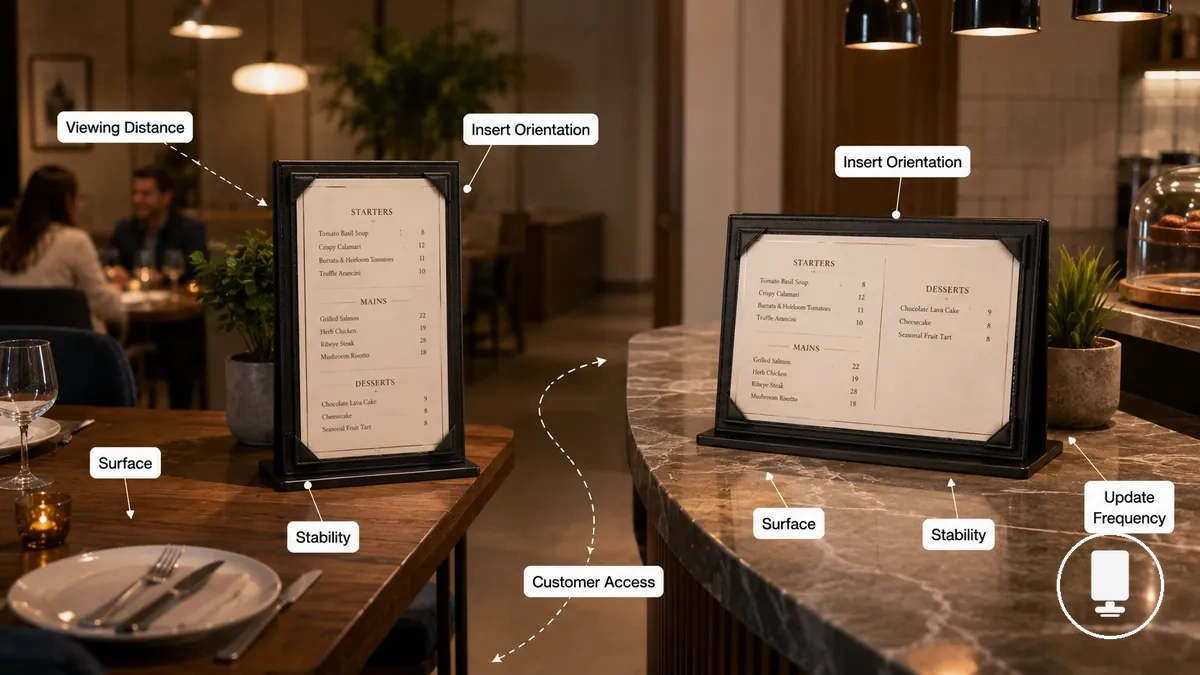
- Surface: A stable surface can support better fit, while uneven or limited surfaces may affect holder position and visibility.
- Viewing distance: Readability may change when a menu holder is viewed from different distances or angles.
- Customer access: Easier access can improve interaction with the menu, while restricted access may reduce practical visibility.
- Stability: Holder stability can influence how consistently the menu remains visible during normal activity.
- Insert orientation: The direction of the menu insert may affect readability within the holder position.
- Update frequency: Frequent menu changes may favor placements that provide simpler update access.
Different surfaces and viewing distances can lead to different menu holder outcomes. A holder that works well in a table context may behave differently in a counter context because customer approach patterns, available footprint, and visibility expectations can vary. For broader placement context beyond these shared conditions, see the menu holders guide.
Surface type, viewing distance, and customer access
Surface type, viewing distance, and customer access determine whether a menu holder placement is likely to provide workable fit and visibility in a specific location. A menu holder may fit on a surface but still offer limited readability if eye-line distance is unsuitable or customer access is restricted. The image below helps verify these local placement conditions.
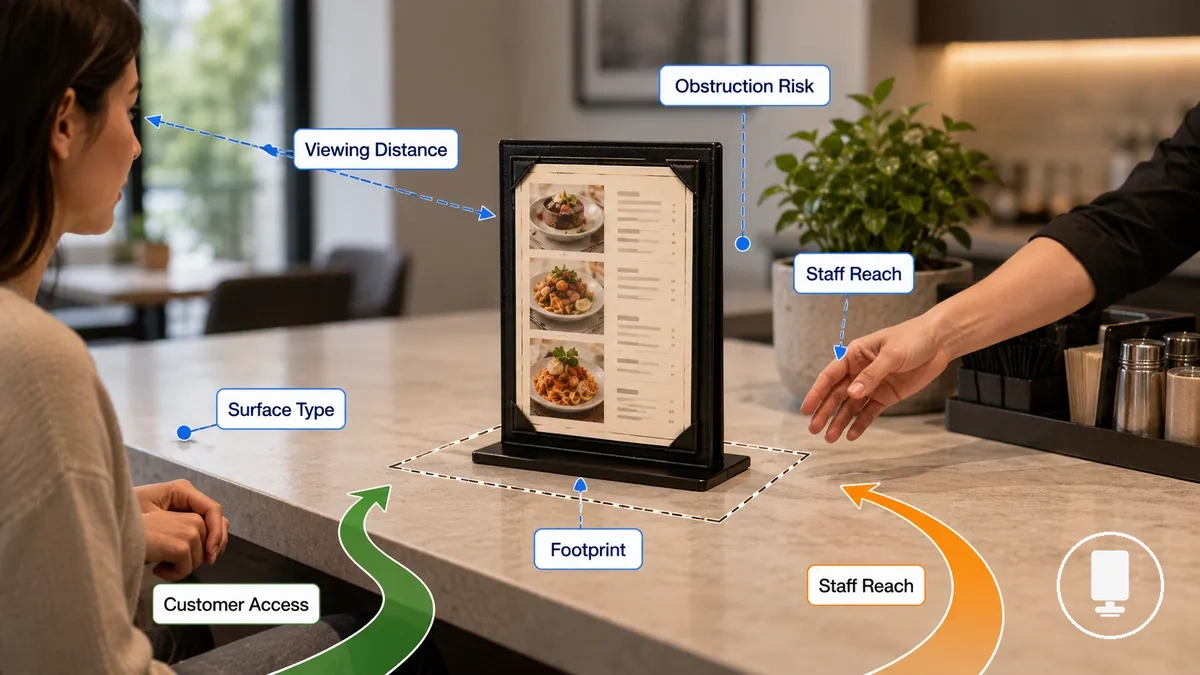
- Surface type and flatness: A flatter surface may support more stable placement, while uneven surface conditions can affect fit and presentation.
- Available footprint: Limited footprint may reduce placement options even when enough surface area appears available.
- Viewing distance: Readability can vary when eye-line distance places the menu outside a comfortable viewing position.
- Customer access and staff reach: Clear access paths may improve interaction, while restricted reach can reduce practical use.
- Obstruction risk: Nearby objects or movement paths may reduce visibility even when the holder position appears suitable.
A large surface does not necessarily create a better placement decision if viewing distance or customer access remains limited. A menu holder that seems workable in one venue layout may behave differently in another because traffic direction, reading behavior, and obstruction risk can vary. These checks are most useful when considered together rather than as fixed rules.
Stability, insert orientation, and menu update frequency
Stability, insert orientation, and menu update frequency refine placement decisions after a menu holder can already fit in the intended location. A suitable placement may still depend on base weight, contact area, viewing direction, and how often menu changes are required. The image below compares these criteria as local placement checks.
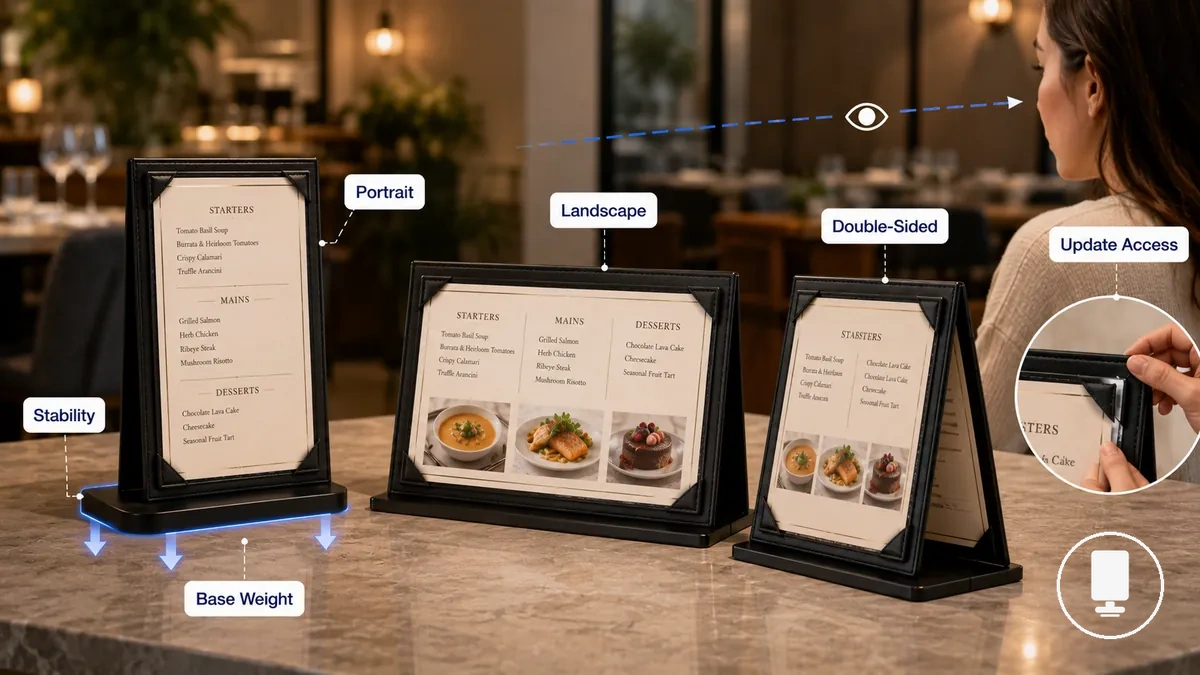
After surface and access checks are satisfied, stability, insert orientation, and menu update frequency can be compared through the following criteria:
| Criterion | What to check | Placement effect |
|---|---|---|
| Stability | Base weight, stable base, and contact area with the placement surface | May influence whether the holder remains consistently positioned during normal use |
| Insert orientation | Portrait or landscape format, insert direction, and customer viewing angle | Can affect readability and whether the display follows the intended viewing direction; it may also help fit menu holders to page formats |
| Update frequency | How often insert changes are needed and how easily update access is available | May affect practical use when menu content requires regular changes |
Double-sided visibility may be useful when customers approach from more than one direction, but its value depends on viewing conditions and access patterns. A stable placement can still be impractical if insert changes are difficult or if the insert orientation faces away from the expected viewing direction.
Table menu holders for seated dining surfaces
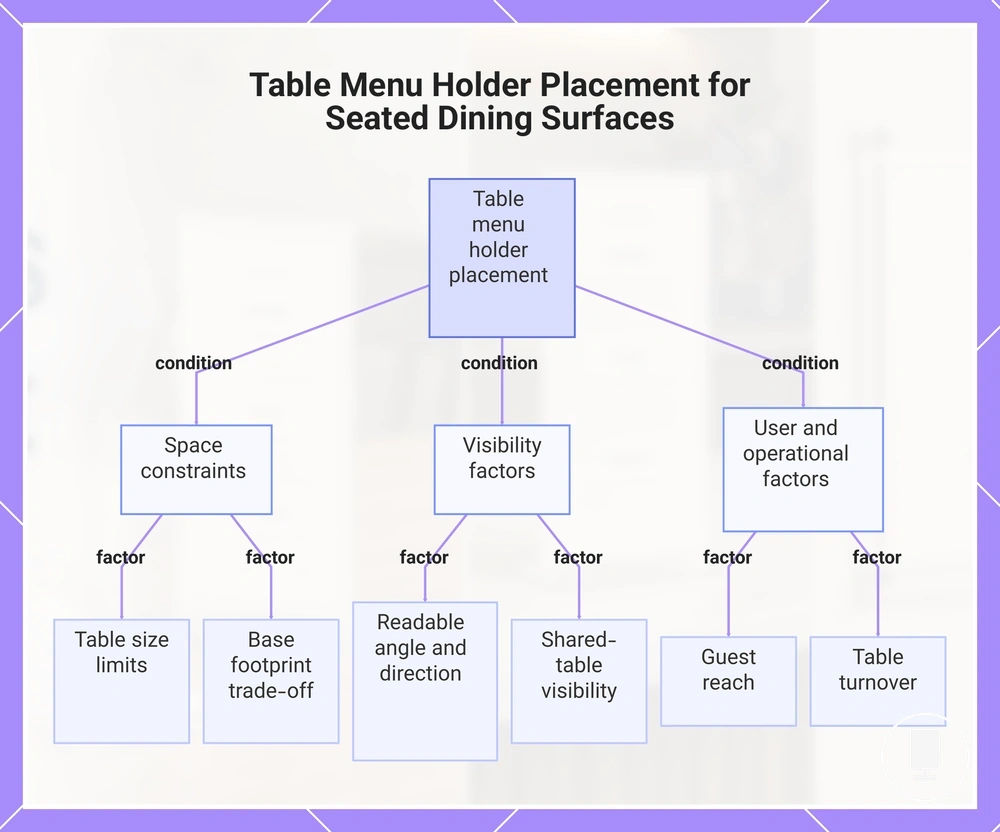
Table menu holders suit seated dining surfaces when table size, base footprint, readable angle, and guest reach allow menu visibility without crowding plates or service items. They work best when menu information remains accessible while preserving the seated guest view. Fit may vary when tabletop space is limited or when shared-table visibility is important.
When plates, service items, and guest interaction share the same surface, placement depends on balancing visibility with usable dining space. A dining table holder with a larger base footprint may reduce available space or affect guest reach. Readable angle and menu insert direction can influence whether menu content remains visible from a seated position. Shared-table visibility may also depend on how guests approach and view the holder from different sides of the table.
When table size creates space constraints, a smaller base footprint can help preserve tabletop usability while maintaining visibility. A readable angle and appropriate menu insert direction may improve viewing conditions for seated guests. Table turnover can influence whether a placement remains practical when menus need to be repositioned or refreshed. For clarification on broader holder categories, see types of menu holders.
The following example illustrates the table-placement decision being evaluated:
- Everyday menus: May suit a consistent tabletop placement when guests regularly need menu access during seated dining.
- Specials or promotions: May suit placements where visibility is the primary objective and dining space remains available.
- Guest reach: Placement should support menu access without interfering with normal table use.
- Table turnover: Frequent menu changes may favor placements that are easy to reposition between guest groups.
This chart shows the key conditions and factors that determine effective placement of table menu holders on seated dining surfaces.
Base stability and guest viewing angle
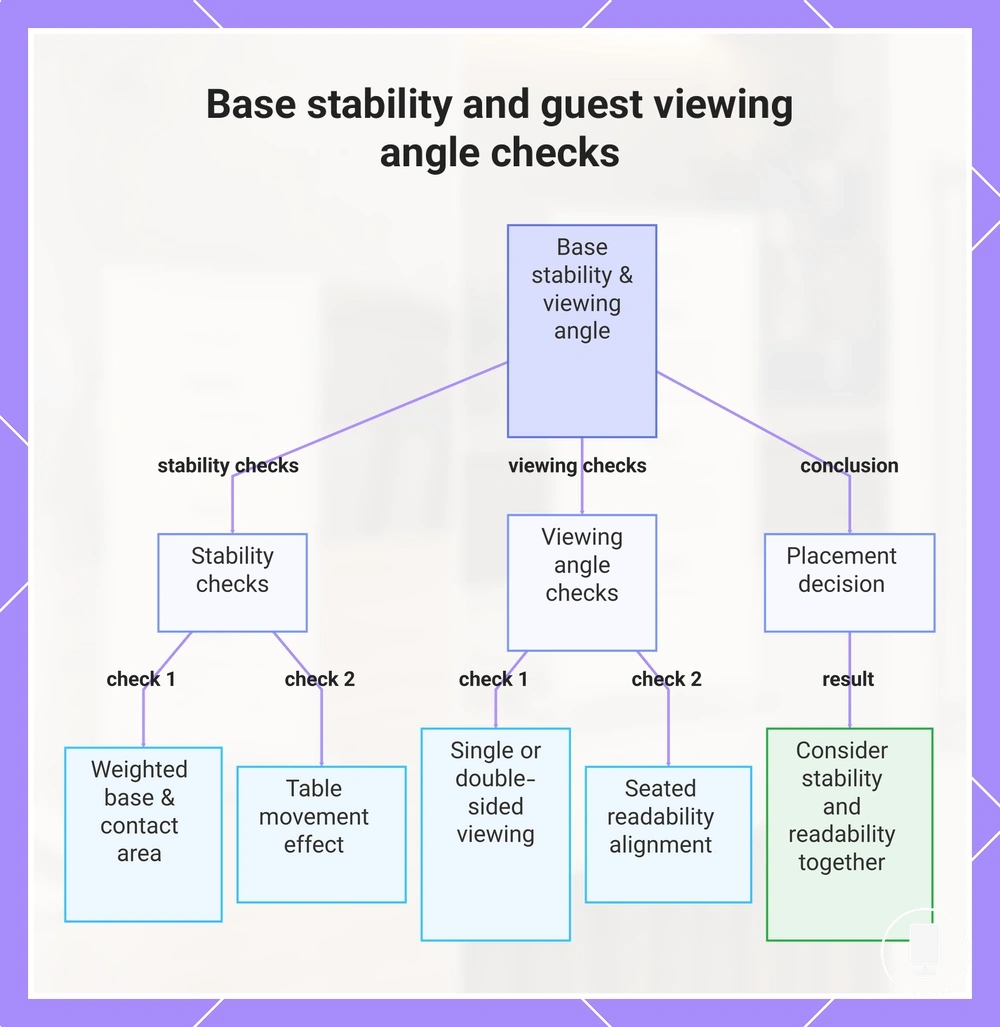
Base stability and guest viewing angle depend on how securely a menu holder stands and how easily seated guests can read the insert from their position. A stable base may support consistent placement, while a suitable guest viewing angle can improve readability. A holder that stands securely may still be difficult to read if the viewing direction does not match the seated guest position.
The following checks help verify base stability and guest viewing angle in table placement:
- Base contact: Weighted bases and sufficient contact area may help the holder remain steady on the table surface.
- Table movement: Placement can vary when table movement or guest interaction affects holder position.
- Viewing side: Single-sided viewing may suit one primary guest direction, while double-sided viewing can support visibility from more than one side.
- Seated readability: Guest viewing angle and insert direction should align with the expected seated guest view for clearer visibility.
When contact area is limited, base stability may become more dependent on placement conditions. Conversely, a holder that remains steady may still offer limited readability if the guest viewing angle does not suit seated guests. The placement decision usually benefits from considering stability and readability together rather than treating them as separate criteria.
This chart shows the key checks for verifying menu holder base stability and guest viewing angle, and the conclusion that both factors should be considered together.
Counter menu holders for ordering and checkout points
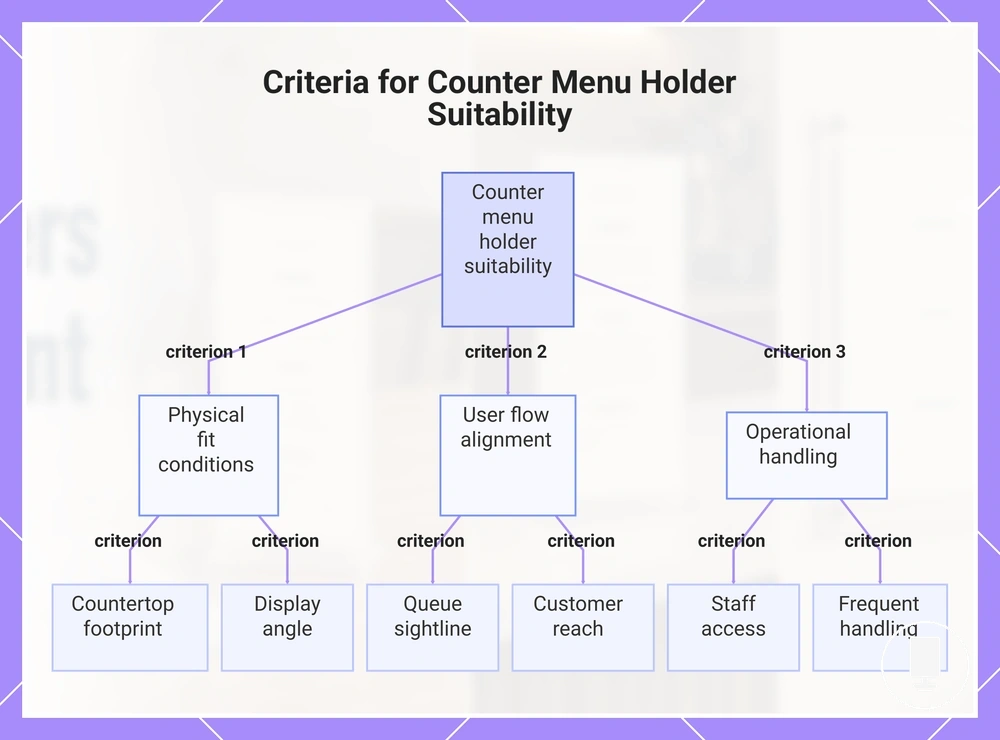
Counter menu holders fit ordering points and checkout points when countertop footprint, queue sightline, staff access, and customer reach support menu visibility without disrupting service flow. They are commonly used where customers make ordering, payment, pickup, or service-point decisions. Suitability can vary based on counter depth, display angle, and frequent handling during daily use.
At a front counter, visibility may depend on whether customers can view the menu while approaching the service area. A pickup counter often places greater emphasis on quick access and clear viewing from a waiting position. At a self-service point, customer reach and display angle may become more important because staff interaction is reduced. These contexts use the same holder category, but fit conditions vary according to customer flow and counter interaction.
The following criteria help determine whether counter menu holders suit a specific counter placement:
- Countertop footprint: The holder should leave sufficient working space for normal counter activity.
- Queue sightline: Menu visibility may improve when the display aligns with the expected customer approach path.
- Staff access: Placement should allow staff to reach surrounding work areas without unnecessary obstruction.
- Customer reach: The holder position may depend on how customers interact with the menu from the counter edge.
- Frequent handling: Suitability can vary when menus are regularly moved, updated, or handled throughout service.
Display angle, countertop footprint, queue sightline, staff access, and customer reach work together when evaluating suitability. A counter menu holder that is visible from the queue may still require adjustment if access needs or handling conditions change during normal operation.
This chart shows the six key criteria that determine whether counter menu holders are suitable for a specific counter placement, grouped into physical fit, user flow, and operational handling factors.
Countertop footprint and queue visibility
Countertop footprint and queue visibility depend on how much counter space a menu holder uses and whether customers can view the menu from the expected queue position. A wider base width may occupy more counter space, while menu height and reading distance can influence visibility from the queue. Placement suitability often depends on balancing visibility with access to nearby service functions.
In a constrained counter layout, countertop footprint may become the primary limitation because staff handoff space, the payment area, or the pickup area can be affected by obstruction. In a deeper service counter, queue visibility may depend more on menu height and reading distance from the customer approach path. The following contrast highlights how counter conditions can change placement implications:
| Counter condition | Placement implication |
|---|---|
| Constrained counter space | Smaller base width may help preserve staff handoff space and reduce obstruction around the payment area or pickup area. |
| Deeper service counter | Greater reading distance may require closer attention to menu height and queue visibility from the expected viewing position. |
Queue direction, customer dwell time, and service-counter layout can influence whether a placement remains practical. Countertop footprint and queue visibility are most useful when evaluated together because visibility gains may be limited if obstruction affects access to key service areas.
Wall-mounted menu holders for fixed display areas
Wall-mounted menu holders fit fixed display areas when menus need to remain visible without occupying table or counter space. Compatibility depends on the mounting surface, eye-level height, readable distance, update access, and traffic flow near the wall. They are often suitable when menu information benefits from a consistent display position and clear viewing conditions.
A fixed display area is a wall placement intended to keep menu information available in a predictable location. The table below compares wall-placement conditions that may influence visibility, update access, and practical use. Mounting details may require site-specific checks, but this section focuses on placement compatibility rather than installation methods.
| Wall condition | Visibility effect | Update access | Main caution |
|---|---|---|---|
| Clear wall placement | May support visibility when eye-level height and readable distance align with expected viewing conditions | Usually allows easier access for menu updates | Traffic flow may affect viewing if people gather nearby |
| High or distant placement | Visibility may decrease when readable distance increases | Update access may require additional staff reach | Menu details can become harder to read from expected positions |
| Busy circulation area | Visibility may vary when movement creates intermittent obstruction | Updates may remain practical depending on wall placement | Traffic flow can reduce viewing consistency |
When eye-level height, readable distance, or update access create viewing challenges, wall placement compatibility often depends on how well the display matches expected use conditions. Insert protection may help maintain menu presentation, while traffic flow near the wall can require caution if obstruction affects visibility. Wall-mounted menu holders are generally most suitable when visibility, update access, and movement around the display remain balanced.
Mounting height, readable distance, and update access
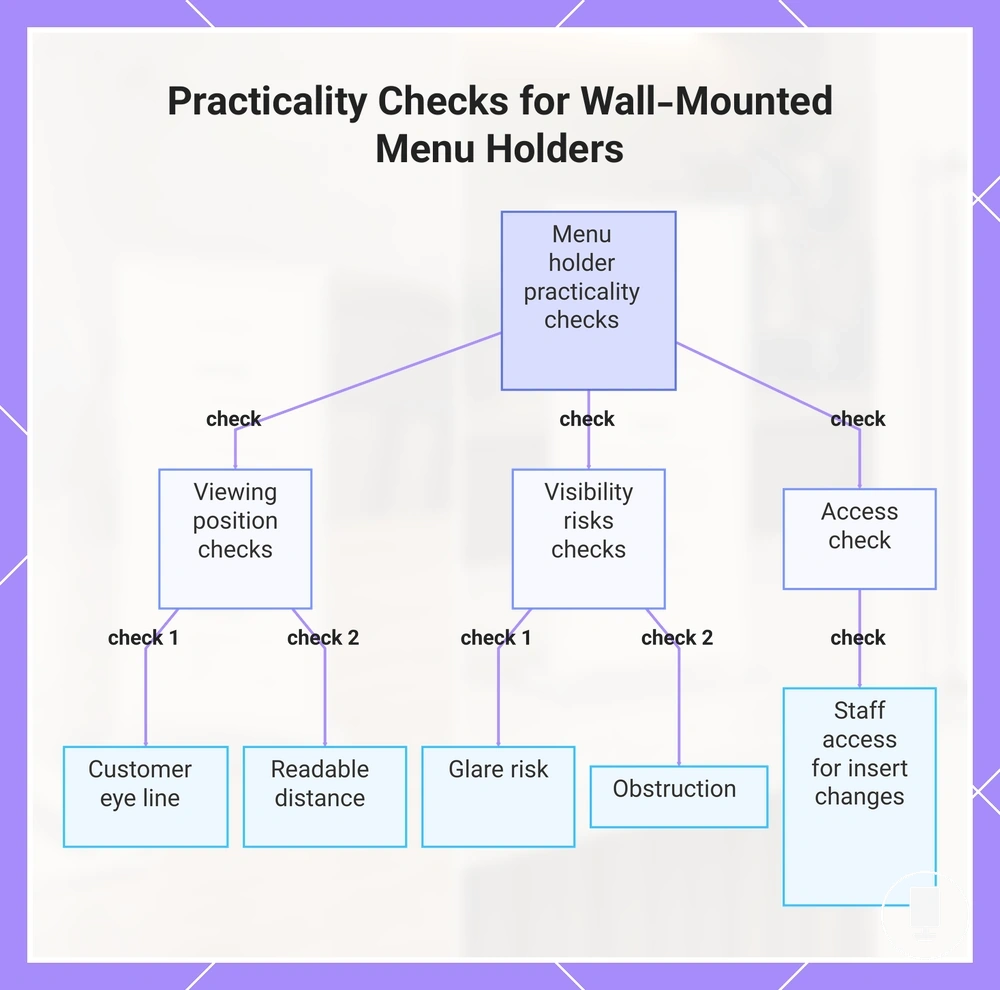
Mounting height, readable distance, and update access affect whether a wall-mounted menu holder remains practical to read and maintain in a fixed display area. Compatibility often depends on how the display aligns with the customer eye line, viewing position, and staff access needs. Readability and update convenience may vary with room layout and customer position.
The following checks help verify mounting height, readable distance, and update access:
- Customer eye line: Mounting height may support better visibility when the menu remains within a natural viewing position.
- Readable distance: Standing or seated reading distance can affect how easily menu information is viewed from the intended location.
- Glare risk: Reflections from lighting or nearby surfaces may reduce readability under certain viewing conditions.
- Update access: Staff access should allow practical insert changes when menu content requires updates.
- Obstruction: Furniture, queues, or nearby movement may affect visibility if they partially block the display area.
Customer eye line, glare risk, staff access, and obstruction are most useful when evaluated together. A readable position may become less practical if glare affects visibility, while update access for insert changes can depend on how the display relates to surrounding furniture, queues, and daily movement patterns.
This chart shows the essential checks for verifying mounting height, readable distance, and update access, grouped by viewing position, visibility risks, and access.
Freestanding menu holders for movable display points
Freestanding menu holders fit movable display points when flexible positioning depends on available floor space, base stability, sign angle, entrance visibility, waiting-area use, promotional use, and traffic-flow clearance. They are often suitable when menu information needs to be repositioned without relying on a fixed display location. Compatibility can vary when movement paths, viewing positions, or available placement space change.
At entrances, freestanding menu holders may improve entrance visibility when floor space allows clear customer approach paths. In waiting-area use, a movable holder can place menu information closer to where customers spend time. Promotional use may benefit from flexible positioning when temporary visibility is needed. These placement contexts remain most practical when traffic-flow clearance is preserved.
| Placement use | Fit condition | Main limitation |
|---|---|---|
| Entrance visibility | May suit locations where floor space supports clear viewing and customer approach | Traffic-flow clearance may become limited if the display reduces walkway space |
| Waiting-area use | Can support readability when positioned near expected viewing locations | Available floor space may restrict placement flexibility |
| Promotional use | Flexible positioning may help when temporary display emphasis is needed | Placement conditions may require ongoing review as customer movement changes |
Floor space, base stability, sign angle, and traffic-flow clearance should be evaluated together because movable-display value can decrease when walkways or service paths become obstructed. A portable menu stand may remain readable through an appropriate sign angle, but suitability can vary when clearance conditions or floor-space availability change. For a broader format comparison, see freestanding clip-on and insert formats.
Floor space, sign angle, and traffic flow
Floor space, sign angle, and traffic flow determine whether a freestanding holder can remain stable, visible, and practical around a movable display point. A larger floor footprint or higher base weight may support steadier placement, while the viewing angle should face the expected customer path. A visible display can still be unsuitable if it narrows a walkway or creates contact risk.
The following checks verify floor footprint, viewing angle, aisle clearance, doorway clearance, and customer path direction:
- Floor footprint: The holder should fit within available floor space without reducing necessary walkway space.
- Base weight: Base weight may support stability when the display is placed where customer movement occurs nearby.
- Viewing angle: Sign angle should align with the expected customer path for clearer readability.
- Aisle and doorway clearance: Aisle clearance and doorway clearance may become limiting when the holder sits near movement paths.
- Customer path: Placement should avoid obstruction where customer path direction creates contact risk.
Display-area menu holders for entrances, promotions, and waiting zones
Display-area menu holders are used in entrances, promotions, and waiting zones where customers need information before ordering or seating. These locations place menu content in view before a customer reaches a service point, helping organize information in a visible and accessible position. Visibility may vary with placement conditions and movement around the display area.
The table below organizes common display-area use cases by customer need, placement condition, and the main caution that may affect visibility or access.
| Display area | Customer need | Placement condition | Main caution |
|---|---|---|---|
| Entrances | Information before ordering | Entrance placement with clear visibility from the approach direction | Movement interference may occur if the display affects access paths |
| Promotions | Promotional message clarity | Display position that keeps messages visible and easy to update | Update frequency may affect ongoing placement suitability |
| Waiting zones | Menu review during customer dwell time | Waiting-area visibility from typical seating or standing positions | Visibility may decrease when surrounding movement creates obstruction |
Display-area menu holders support pre-ordering or pre-seating decisions by presenting information where customers naturally pause, wait, or approach a service area. Customer dwell time may influence how much information remains practical to display, while update frequency can affect how easily content stays current. Movement interference should also be considered because a visible display may become less suitable when customer traffic reduces access or readability.
Choosing the right menu holder placement format
Choosing the right menu holder placement format depends on compatibility between the placement need and the conditions of the intended location. A suitable format is usually determined by how well the holder format matches visibility, access, available space, and placement conditions.
A menu holder placement format refers to the placement option that aligns with a specific use context. Common formats include table, counter, wall, freestanding, and display-area placements, each associated with a different fit condition and main caution.
The decision process becomes clearer when placement context is reviewed before format selection. The table below maps placement context, likely format, fit condition, and main caution to support a compatibility-based decision.
| Placement context | Likely format | Fit condition | Main caution |
|---|---|---|---|
| Dining tables | Table | Available tabletop space and guest visibility | May reduce usable table space if placement is oversized |
| Ordering or service counters | Counter | Customer visibility and staff access | Counter activity may limit placement options |
| Fixed information displays | Wall | Readable distance and update access | Visibility may vary with viewing position |
| Movable display points | Freestanding | Floor space and traffic flow conditions | Walkway interference may affect suitability |
| Entrances, promotions, and waiting zones | Display-area | Visibility before ordering or seating | Movement around the display may affect access |
Compatibility remains the main decision filter across placement contexts. A table, counter, wall, freestanding, or display-area format may be the suitable format when the placement need, fit condition, and main caution align with the intended use.
Selecting a menu holder placement format is usually easier after confirming the placement condition that matters most in the target location. For a broader selection framework, see how to choose menu holders.
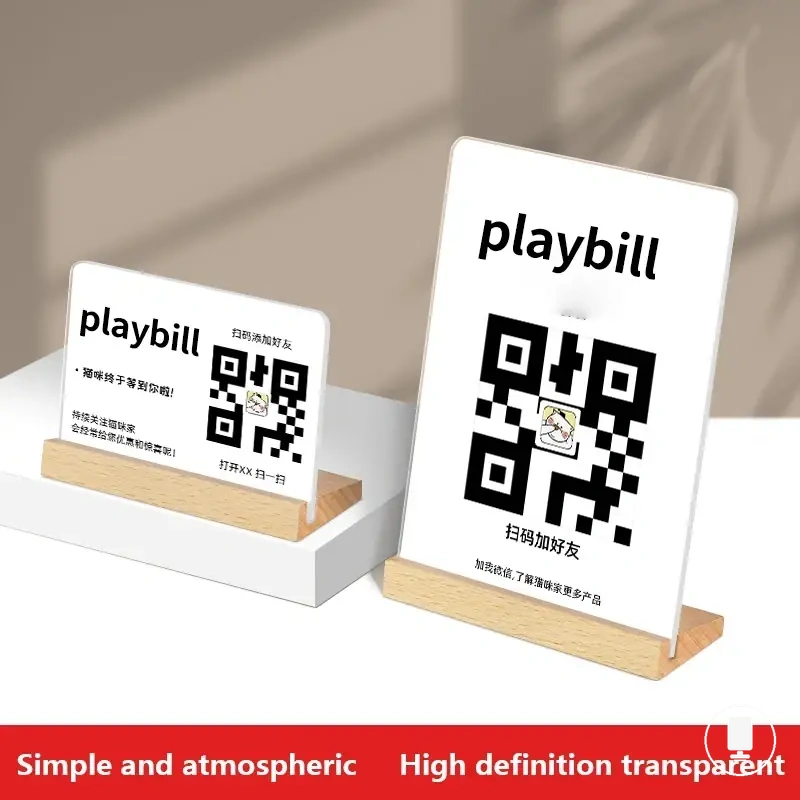
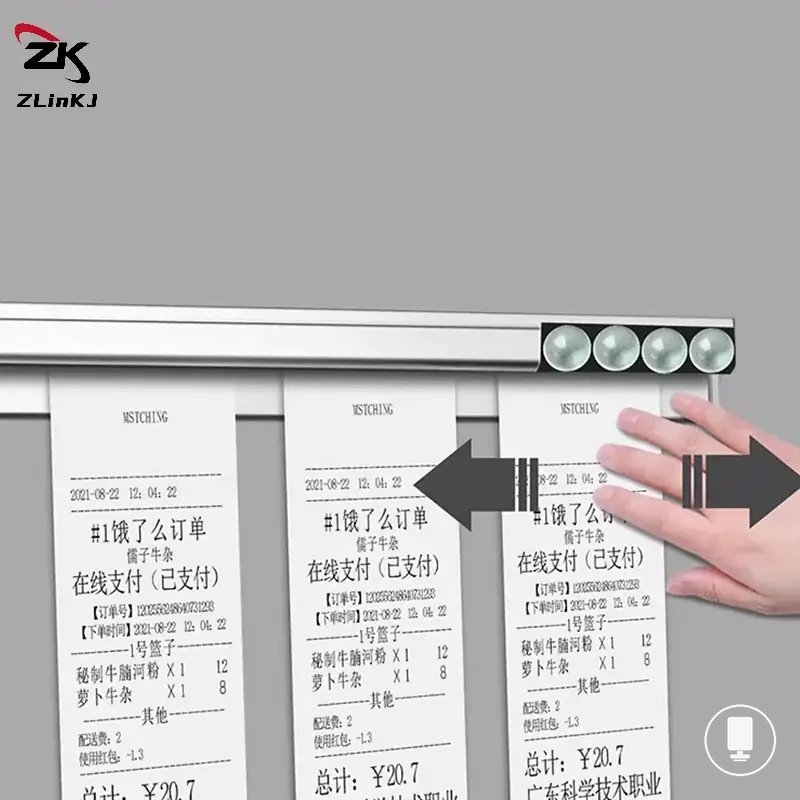
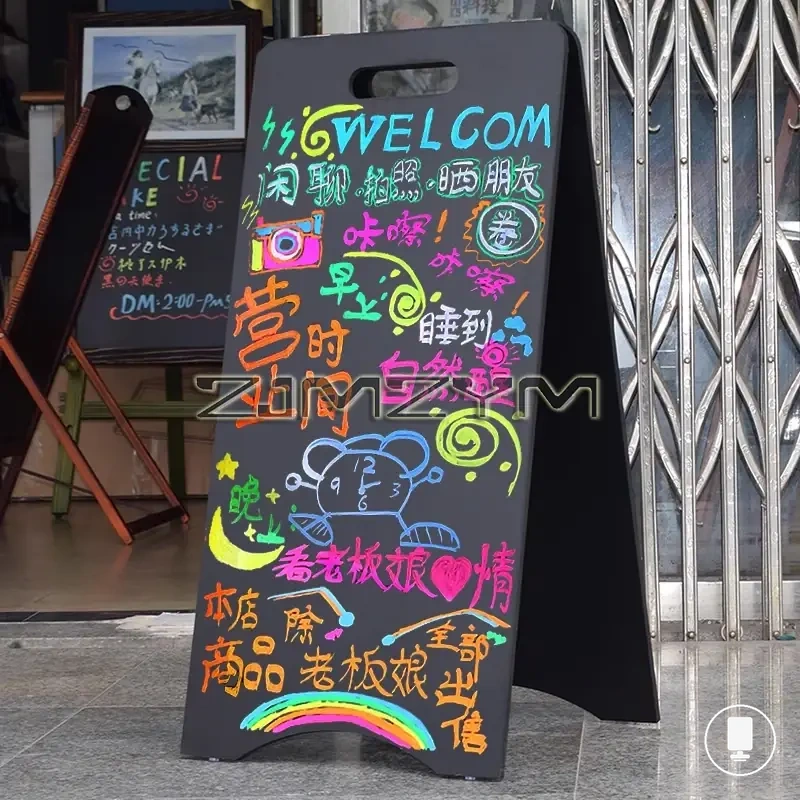
The products below are useful examples for comparing available options. Before buying, check that the compatibility criteria, key features, and product details match your needs.

Placement risks that reduce readability or stability
Placement risks reduce readability or stability when the holder does not match the surface, angle, access, or traffic condition of the intended location. These placement risks can create visibility issues, stability issues, or practical-use limitations even when the holder otherwise appears suitable for the placement need.
Glare and a poor angle may make menu content harder to read from the expected viewing position. An unstable base or cramped surface can reduce stability when available space does not support the holder properly. Blocked access may limit customer or staff interaction with the display, while difficult insert updates can make routine menu changes less practical. Traffic obstruction can also become a placement problem when movement paths interfere with visibility or access.
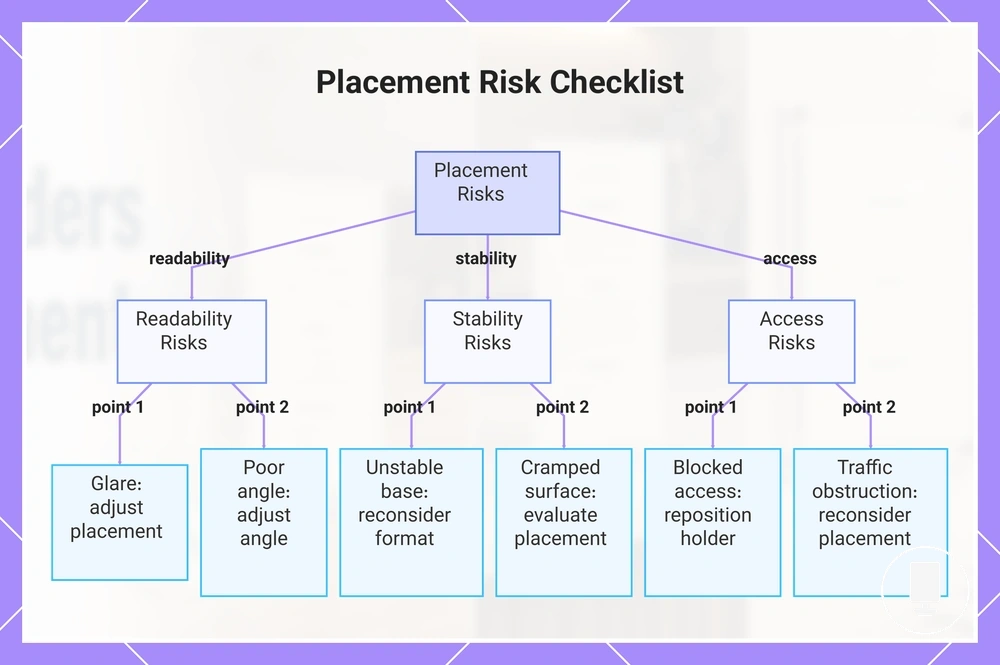
The checklist below helps verify whether a placement condition should be treated as a minor adjustment or a reconsideration signal. Each item pairs a placement risk with a decision to adjust placement or reconsider format when the condition continues.
- Glare: If reflections reduce readability, adjust placement or viewing direction before reconsidering format.
- Poor angle: If menu content remains difficult to view, adjust the angle or placement position.
- Unstable base: If stability remains limited after placement changes, reconsider the holder format.
- Cramped surface: If available space restricts normal use, evaluate a different placement option or format.
- Blocked access: If customers or staff cannot reach the display comfortably, reposition the holder.
- Difficult insert updates: If menu changes remain inconvenient after relocation, a different format may be more suitable.
- Traffic obstruction: If movement paths continue to affect visibility or access, reconsider placement or format.
Many placement risks can be reduced through changes in position, angle, or access conditions. When instability continues despite reasonable placement adjustments, see fix unstable menu holders for broader troubleshooting guidance.
This chart categorizes placement risks that reduce readability, stability, or access and pairs each risk with a recommended action.